An event website that changes with your event.
Most event websites stay the same from the first invitation to the last photo. With Pragte you design every phase once, and the same link becomes the welcome page on the day and the memories afterwards.
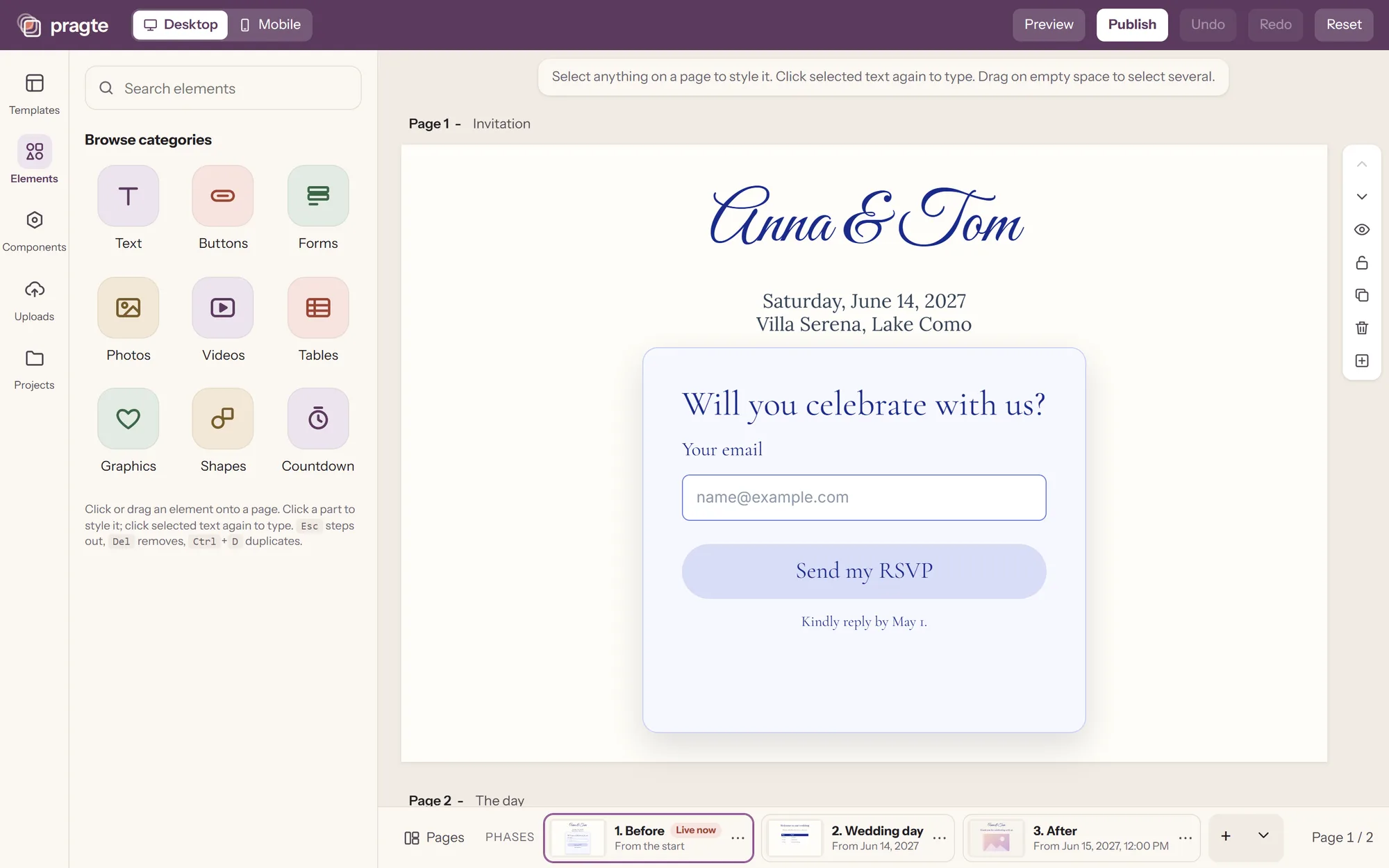
Every event has phases.
Before, during and after look different for every kind of event. Pragte's phases take whatever names your event needs, and each one switches on when its moment comes.
| Event | Phase 1 | Phase 2 | Phase 3 |
|---|---|---|---|
| Wedding | Before | Wedding day | After |
| Birthday | Invitation | Celebration | Memories |
| Conference | Registration | Live event | Recordings |
| Fundraiser | Coming soon | Accepting donations | Completed |
| Product launch | Waitlist | Available | Sold out |
| Memorial | Announcement | Service | Tributes |
Phases switch on a date and time you set, or by hand from your phone. Weddings have the first templates; for other events, rename the phases and build your own pages.
How to create an event website with Pragte.
- 1
Design your pages
Start from a template or a blank page. Place anything anywhere, and arrange the phone layout separately.
- 2
Prepare each phase
Each phase is its own version of the site, with its own pages. Name them for your event and give each a start date.
- 3
Publish once
Share one link or QR code. The site switches phases on the dates you set, or when you switch it by hand from your phone.
What your visitors get.
Every part works as soon as you add it, and looks like the rest of your design.
- Forms
- Questions you write yourself, styled to match your design: an RSVP, a sign-up, a request. Submissions land in one list you can download.
- Countdown
- Counts down to the day, then gives way to the next phase.
- Schedule
- Times and places in a table your visitors can read on any phone.
- Search a list
- Visitors type their name and find their row. At a seated event, that is their table, with the rest of the list never on view.
- Uploads
- Visitors scan a code and share photos, with no app or account. You approve what appears.
- Live controls
- Run the day from your phone: switch the phase, post an announcement, open or close a form, approve uploads.
Is Pragte the right event website for you?
A good fit
- Weddings, birthdays, anniversaries and reunions
- Community events, school and team events
- Memorials and celebrations of life
- Launches and small events that want a designed site, not a form
Look elsewhere if you need
- Ticket sales and payments at checkout
- Badge printing and on-site check-in
- Multi-track agendas for large conferences
A dedicated event registration platform is built for those.
Free, with no expiry date. Pay once when it matters.
Build and share an event website for free, public or with a password, and keep it online for as long as you like. For your own domain and branding-free months around the event, pay once from $29.99, per website. No subscription.
See pricingEvent websites, answered.
What is an event website?
A website for one event: the invitation, details and RSVP before it, the schedule and practical information on the day, and photos or a thank-you afterwards. Everyone opens one link instead of chasing messages.
What makes a Pragte event website different?
It changes with the event. You prepare each phase ahead of time, and the same link shows the invitation first, the welcome page on the day and the memories after. Live controls on your phone run the day.
Can I use Pragte for events other than weddings?
Yes. Weddings come first and have the first templates, but phases can be named for any event: a birthday, a reunion, a conference, a launch or a memorial.
Can Pragte sell tickets?
Not today. Pragte is built for invitations, RSVPs and the experience around the event. If you need ticket sales, badge printing or check-in for a large conference, a dedicated event registration platform is the better fit.
Do visitors need an app or an account?
No. Visitors open your link or scan a QR code in their phone browser to answer a form, search a list or share photos: at a wedding, to RSVP, find their seat and add their pictures.
How much does an event website cost?
Building and sharing a site is free, public or with a password, and it has no expiry date. For your own domain and branding-free months, plans start at $29.99 once, per website. There is no subscription.
Planning a wedding? See digital wedding invitations, or read how Pragte works. For a seated event, see how guests can find their table online.
Your event is almost ready.
Pragte is in early access, starting with weddings and personal events. Leave your email and tell us what you are planning.