Design it the way you design in Canva. Get a website that does more.
Pragte is a website builder with a free canvas: drag anything anywhere, any font, any color. Then it works like a real website, with a phone layout you arrange yourself, forms that collect replies, and pages that change on the dates you set.
Pragte is independent and not affiliated with Canva.
When Canva's website builder is enough
If you need a single page, a link-in-bio or a simple portfolio, and you already make your graphics in Canva, its website builder is a quick way to publish. Its free plan allows up to five live sites.
When you want more from the website
When visitors need to reply, sign up or order; when the site should look right on a phone because you arranged it there; or when it should change for an event or a season, a website builder made for that is the better fit.
Canva websites and Pragte, side by side
Canva's side as its own help pages describe it, checked October 2026. Features change, so check Canva's help for the latest.
| What | Canva websites | Pragte |
|---|---|---|
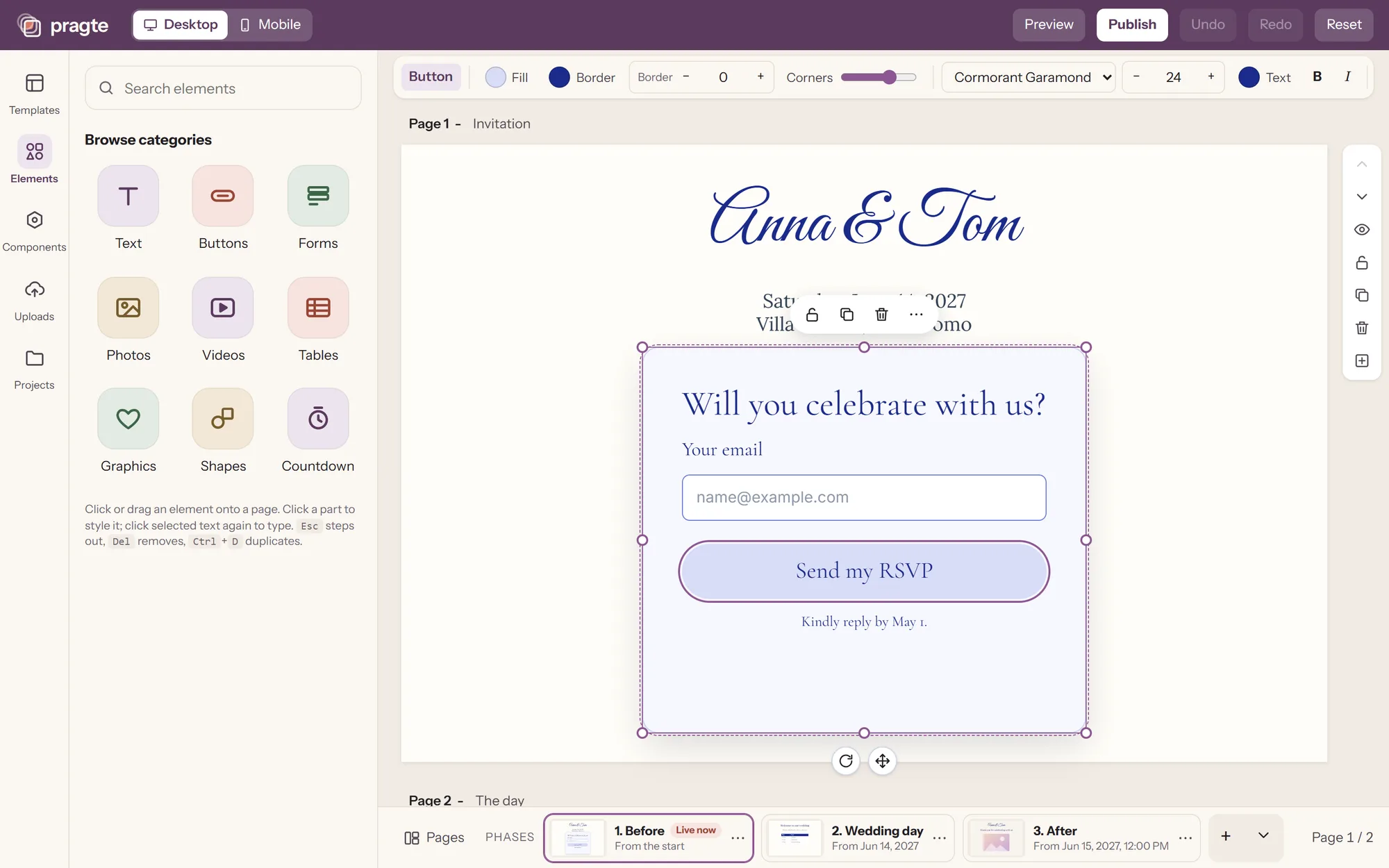
| How you design | A free canvas: place anything anywhere | A free canvas: place anything anywhere, and click any part of a form or button to style just that part |
| On phones | The desktop design adapts ("Resize on mobile"): things side by side may stack | A phone layout you arrange yourself, sharing the same words and photos |
| Free plan | Up to five live sites on a free Canva address, with a "Designed with Canva" footer | One live site at a time on a pragte.site address, with a small "Made with Pragte", and no expiry date |
| Hiding the branding | Canva Pro, a subscription | Paid once: $29.99 for 3 months, $49.99 for 12 months. Nothing renews |
| Your own domain | Canva Pro, Teams, Business or Education | Essential or Keepsake, and it stays after the paid months |
What Pragte adds to a designed website
The parts a website needs once people start using it, each styled like the rest of your design.
- Forms that collect replies
- An RSVP, an order request, a sign-up: every field styled like the rest of your design. Replies land in a list you can download, and paid plans email you each one.
- Pages that change on a date
- Prepare a version of the site for each stage (the invitation, the day, the thank-you; or everyday and the holidays) and Pragte switches on the dates you set.
- Live controls on your phone
- Switch the phase, post an announcement, open or close a form, approve uploads, while things are happening.
- Photos from your visitors
- Visitors scan a code and send photos from their phone, with no app or account. You approve what appears.
- Questions that open
- Accordions for a FAQ or a product’s details: on the site, what is below makes room as a question opens.
- Searchable lists
- A seat finder or a price list from a sheet: visitors type and see only their row.
Moving a Canva site to Pragte
- 1
Take a screenshot of each page
Of your published Canva site, on a computer. Download your photos from Canva too.
- 2
Let the AI rebuild it
In Pragte's editor, show the AI a screenshot and it builds a design from it, as a starting point to adjust.
- 3
Arrange the phone layout
Switch to Mobile and place things for a phone. The words and photos are shared with desktop.
- 4
Publish
Free on a pragte.site address, or with your own domain on a paid plan.
Where Canva is the better choice
- One place for social posts, presentations, print and a website.
- A very large library of templates, photos and graphics.
- Up to five free live sites, where Pragte's free plan has one at a time.
Questions about switching
Is Pragte made by Canva?
No. Pragte is an independent website builder and is not affiliated with Canva. We compare the two because many people design their first website in Canva.
Can I move my Canva website to Pragte?
Not by importing it: Canva and Pragte keep designs differently. The quickest way is the AI in Pragte's editor: show it a screenshot of a page of your Canva site and it builds a design from it, which you then adjust. A design from a picture costs a few AI credits, and every account starts with 100 free. Download your photos from Canva and drop them into the new design.
Is Pragte free?
Yes. A published site is free, with no expiry date, public or with a password. Paid plans are paid once, for your own domain and a few months without Pragte branding. There is no subscription.
Do I need to know how to code?
No. You design on a canvas as you would in Canva, and Pragte turns it into a website with its own phone layout.
Should I keep using Canva?
For social posts, presentations and print, probably yes: Pragte only makes websites. Many people design in Canva and build the website in Pragte.
See how Pragte works, the pricing, orevent websites.
Your moment is almost ready.
Pragte is in early access, starting with weddings. Leave your email and we will keep you posted: what we add, and help getting your site started.